Schema Markup for Local Businesses

Have you ever searched for a business on Google and noticed one listing shows star ratings, business hours, and an address directly in the results, while others show nothing but a title and a description? That difference is rarely accidental. In most cases, it comes down to schema markup for local businesses.
If your competitor's listing looks richer and more informative than yours, local business schema markup is likely the reason, and the gap is costing you clicks right now.

Think of schema markup as handing Google a completed index card about your business. On that card, you've written your name, address, phone number, hours, and customer ratings. Without that card, Google has to read your entire website and guess at the details. When it guesses wrong, or gives up, you become invisible while competitors with completed index cards stay visible.
Local business schema markup is code added to your website that visitors never see. It sits in the background and speaks directly to search engines. It gives them structured, unambiguous information about what your business is and what it offers.

Google recommends JSON-LD as the preferred format for structured data, described as "the easiest solution for website owners to implement and maintain at scale." This block sits in the <head> section of your website's HTML.
The code looks like a structured list of labeled fields: "name", "address", "telephone", "openingHours". Each field tells Google exactly what it's reading. The result is that Google stops guessing and starts displaying.
Listings that appear with star ratings, hours, and address information, known as rich results, consistently receive higher click-through rates than plain blue-link listings. Research on Google SERP rich result performance confirms that rich results achieve significantly higher CTRs than plain listings for the same search query.
Position alone doesn't determine who wins the click. A rich result at position three often outperforms a plain listing at position two because the visual difference captures attention in a way plain text can't. When your competitor's listing shows four-and-a-half stars, their hours, and their address while yours shows only a title and description, they win the click even at the same rank.
Consider the math. Your business receives 400 local search impressions per month. If missing local SEO schema reduces your click-through rate by 20-25% compared to a competitor with a richer listing, that's 80-100 fewer website visits every month. For a law firm, medical practice, or contractor where a single new client is worth thousands of dollars, those missed visits represent a compounding loss.
Schema markup changes how your listing looks. It also changes who sees it and who clicks.
Not all schema types carry equal weight. These five have the most direct impact on local search visibility.
| Schema Type | What It Displays | Who Needs It Most |
|---|---|---|
| LocalBusiness | Name, address, phone, website, category | Every local business |
| NAP (within LocalBusiness) | Consistent contact details across Google | All businesses with a physical location |
| AggregateRating | Star ratings in search results | Service businesses, medical practices, law firms |
| OpeningHoursSpecification | Business hours directly in SERP | Retail, restaurants, service providers |
| Service | Specific services offered | Contractors, law firms, medical practices |
LocalBusiness schema identifies your business name, address, phone number, website URL, and business category to Google. Without it, none of the other schema types carry their full weight.
Google's structured data documentation confirms that LocalBusiness schema supports industry-specific sub-types. Law firms use LegalService. Medical practices use MedicalOrganization. Contractors fall under HomeAndConstructionBusiness. These extensions give Google more confidence in categorizing your business correctly.
NAP, which stands for Name, Address, Phone, must match exactly between your schema markup, your website, and your Google Business Profile. Not approximately. Exactly.
"123 Main Street" and "123 Main St" are technically the same address, but inconsistencies like this reduce Google's confidence in your listing data. That reduction in confidence can mean suppressed rich results or reduced prominence in the local pack. If you're investing in local SEO, NAP consistency across all touchpoints is foundational.
AggregateRating schema displays star ratings directly in Google search results. It pulls from your actual review data and must reflect real, accurate information. Google cross-references it against your actual reviews and will suppress the rich result if the data appears manipulated.
OpeningHoursSpecification tells Google your business hours so they appear in the SERP before a user even clicks your site. For any business where hours affect whether someone contacts you, this directly influences conversions.
Service schema tells Google the specific services you offer. A roofing contractor listing "roof repair," "gutter installation," and "storm damage assessment" in structured data local SEO tells Google that you're a contractor and which searches you're genuinely relevant for.
For websites built on custom code or platforms with full HTML access, JSON-LD is the recommended approach. Here's a basic LocalBusiness example.
<script type="application/ld+json">
{
  "@context": "https://schema.org",
  "@type": "LocalBusiness",
  "name": "Your Business Name",
  "address": {
    "@type": "PostalAddress",
    "streetAddress": "123 Main Street",
    "addressLocality": "Your City",
    "addressRegion": "FL",
    "postalCode": "32201"
  },
  "telephone": "+1-904-555-0100",
  "openingHours": "Mo-Fr 09:00-17:00",
  "aggregateRating": {
    "@type": "AggregateRating",
    "ratingValue": "4.8",
    "reviewCount": "47"
  },
  "url": "https://www.yourbusiness.com"
}
</script>
This block goes in the <head> section of your page HTML, or you can inject it via Google Tag Manager without touching your site's code directly.
If your site runs on WordPress, you don't need to write JSON-LD manually. Both Yoast SEO and Rank Math handle local business schema markup through their settings panels. In Yoast, navigate to SEO > Local SEO and confirm your business details are entered correctly. In Rank Math, go to Rank Math > Titles & Meta > Local SEO and verify the schema type matches your business category.
Plugin-generated schema should always be validated after setup. Plugins don't always populate every required field, and partially complete local business schema can produce worse results than no schema at all.
Shopify includes basic Product schema natively but doesn't automatically generate local business schema markup for stores that also serve a physical location. If your Shopify store has a brick-and-mortar presence, you'll need to add LocalBusiness schema separately through a dedicated app or theme code edits.
WooCommerce users can extend structured data through Rank Math's WooCommerce integration, which handles both Product and LocalBusiness schema from one settings panel. For either platform, custom implementation is worth considering when accurate local data and service-area targeting are priorities.
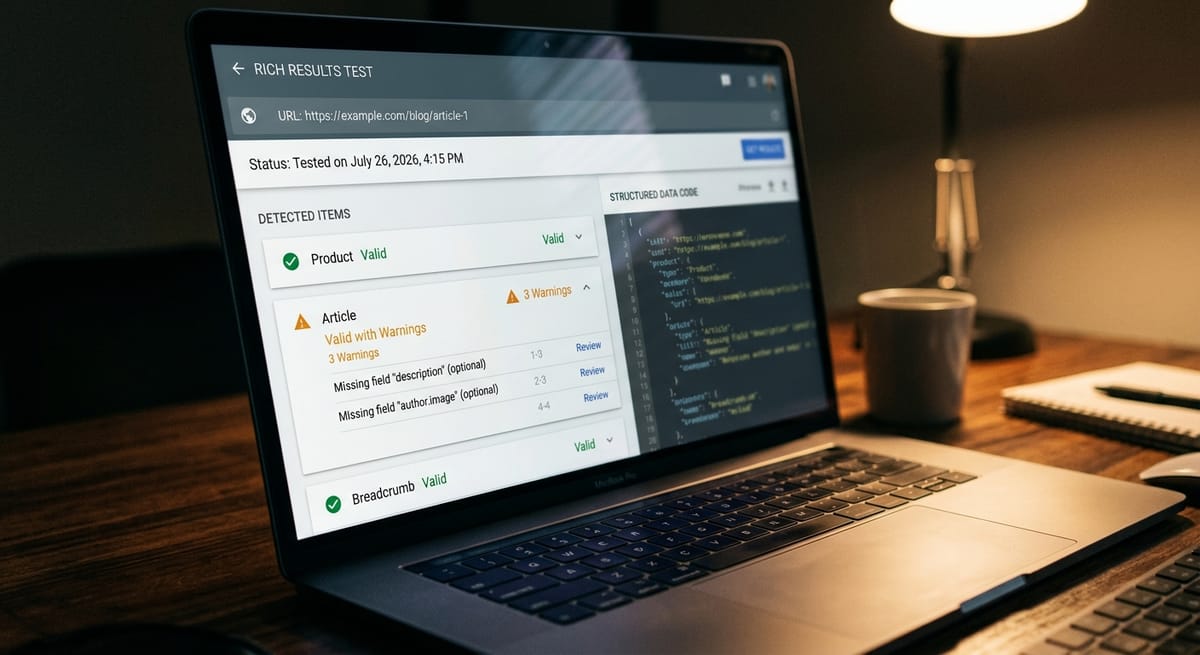
Google provides a free validation tool at search.google.com/test/rich-results. Paste your page URL or your JSON-LD code directly, and the tool tells you which schema types were detected, which required properties are present, and which are missing or invalid. After implementation, monitor the Enhancements report in Google Search Console to track structured data status across your entire site.
Five mistakes that invalidate your local SEO schema.
Organization instead of LocalBusiness means Google won't generate local rich resultsA technical SEO audit will surface these structured data issues systematically if you're unsure where your current implementation stands.
Rich results typically appear within two to six weeks of correct schema markup implementation, once Google recrawls and reindexes the relevant page. Local business schema markup is a structural improvement with compounding returns over time, not an overnight fix.
Schema markup for local businesses follows clear, learnable rules once you understand the structure. The businesses appearing with richer Google listings aren't doing something mysterious. They've made sure Google has accurate, structured data to work with.
If a site audit has flagged structured data gaps, or if competitors consistently appear with richer local search results, Grindstone's local SEO services include schema implementation and validation as part of a broader technical foundation.
Is local business schema markup a direct ranking factor?
Schema markup is not a confirmed direct ranking factor. However, structured data local SEO strongly correlates with higher click-through rates by enabling rich results, including star ratings, hours, and addresses, that make your listing more clickable than plain results. Higher CTR signals relevance to Google and can improve rankings indirectly.
Do I need local SEO schema if I already have a Google Business Profile?
Yes. They serve different purposes. Your Google Business Profile controls how you appear in Google Maps and the local pack. Schema markup on your website tells Google what to display in organic search results and knowledge panels. Both should be in place, and your NAP data must match exactly across both.
Can schema markup hurt my rankings if implemented incorrectly?
Incorrect local business schema typically won't trigger a ranking penalty, but it can cause rich results to be suppressed entirely. Schema that contradicts visible page content violates Google's structured data guidelines and can lead to manual actions in more severe cases.
How often should I update my local business schema markup?
Update it whenever your business details change. If your address, phone number, hours, or service areas change and your schema markup isn't updated to match, Google detects the discrepancy and may stop displaying your rich results.
Is schema markup worth the effort for a small local business?
Yes, especially when competing against larger, better-resourced businesses. Rich results from local business schema markup allow smaller businesses to display star ratings, hours, and contact information at the same visual prominence as major brands. For service businesses where a single new customer represents significant revenue, correct structured data implementation typically pays for itself.
Can I apply local business schema to individual service pages?
Yes, and you should. Applying LocalBusiness schema site-wide and Service schema to individual service pages reinforces local search relevance for specific queries. A dedicated "roof repair" page with structured data local SEO is more likely to appear for that specific search than a homepage claiming to offer many services.
Related reading: The Impact of Local SEO on Your Business · What Does an SEO Agency Do? · Website Not Showing Up on Google?
Discover more insights from our latest articles


